In the Hilo App, you can create a report in PDF format with all the measurements taken in a specific time range to view, save, or to email it to your Doctor.
Important! The report will be available only after 7 days of data recording.
To print a report:
Go to the Insights tab, scroll down to "Blood pressure report" and click on the Download button beside.
Alternatively, go to the Profile tab and click on Blood pressure report.
Next, choose either a weekly or monthly report, enter the dates, and click on “Generate Report.”
| Hilo Band User |
| You will find all the individual readings on the report generated. The Summary Table separates data into Daytime (Resting) and Night-time to show blood pressure patterns across different times of day, helping identify trends and variations important for health assessment. Some entries have a special icon to indicate the type of measurement taken: Initialization with cuff measurement, On-demand cuff measurement, On-demand phone measurement. Any notes you add in the app will be displayed in the health report under the "My Notes" section, along with the date and time. 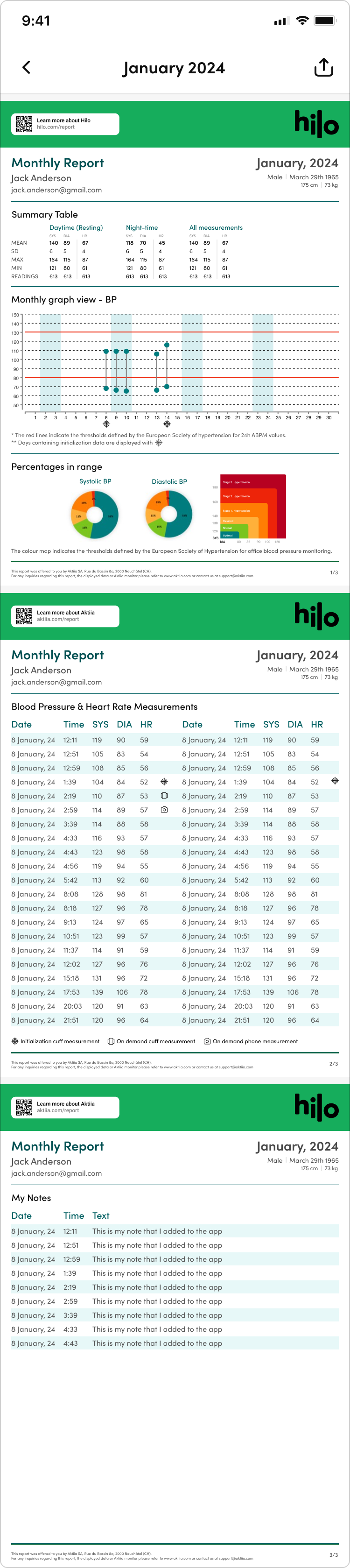 |
Was this article helpful?
That’s Great!
Thank you for your feedback
Sorry! We couldn't be helpful
Thank you for your feedback
Feedback sent
We appreciate your effort and will try to fix the article